Cord Cutting or AT&T ruined DirecTV and how we fixed the problem

Summary

We have been testing streaming services off and on for the past several years. We were early adopters for various streaming devices (Roku, Chromecast) and many streaming services, including Netflix (DVD, now streaming), Amazon Prime, Netflix, Hulu, Britbox, DirecTV Now, and YouTube TV.

Recently we had our roof replaced. In doing so, our DirecTV dish was removed, and after review, we decided to cancel our DirecTV subscription.

Details

Prior to YouTube TV, other ‘cable replacement’ options that provided local TV as well as the non-network content we wanted were almost unusable from an interface standpoint.

Cable replacement requirements

  1. Roku device support
  2. Local channels, BBC America, and short list of cable stations we like
  3. Usable User Interface – high priority
  4. Cloud DVR capability – minimum of 200 – 300 hours (record Olympics)

Throughout these experiments, DirecTV has been our cable provider of choice. DirecTV offered the content we wanted as well as innovative technology, such as the DirecTiVo. I was able to pick up used DirecTiVo’s for <$50 and upgrade them with large hard drives to get ~300 hours of recording time. This was great because we had three school age daughters and I dedicated one unit to record just about the entire Olympics coverage circa 2004.

5 Very Common Cord Cutting Mistakes & How You Can Avoid Them

https://www.cordcuttersnews.com/5-very-common-cord-cutting-mistakes-how-you-can-avoid-them/

  1. Rushing into cord cutting – before we cut the cord, we used the Roku and at least a dozen streaming services for several years. This was not something new for us, so when the time came, it was easy for us to make a joint decision.
  2. Cord cutting does NOT work like cable – we determined we required a streaming service that provided local channels, some cable channels, and had at least a 200-hour DVR capability, ideally cloud based. YouTube TV has an unlimited DVR capability.
  3. Cost – we tracked costs of cable and streaming services
  4. Content – you can’t have everything. For example, we do NOT care about sports, but we DO care about Olympic coverage, BBC America, and some channels like Hallmark that our family likes to binge during winter holidays.
  5. Robust Internet provider – we aren’t huge fans of Comcast/Xfinity cable, but they have provided a robust, broadband Internet service. They are also the ONLY broadband option in our area. DSL is available, but not broadband. We are half way between two CO’s, and FIOS doesn’t have a contract with our township

Cons – we live in an imperfect world…

  • No Hallmark Channel. I don’t care, but my wife and daughters (who don’t even live with us) are relentlessly nagging campaigning to subscribe to the Hallmark Channel for holiday movies.
  • CBS DVR shows are actually “CBS On Demand” and have commercials that you can’t skip. Also, until the software was upgraded, it didn’t handle the transition to/from commercials properly which caused some shows to hang. Credit to YouTube/CBS for fixing this.
  • Bandwidth to the TCL TV – we have experienced some buffering issues and sluggish interface behavior with Roku TV. This isn’t a show stopper, and I have been making it a “priority device” for Google WiFi. Next step is to configure an Ethernet connection.
  • That’s it! We are very happy with the cord cutting.

Cost

Subscriptions (monthly)
YouTube TV        $49.99
Hulu w/no ads        $11.99
Netflix            $13.85
Total            $75.83

AT&T DirecTV was $96.91 – $102 for two TV’s, the least expensive package available, and DVR with whole home viewing

Hardware

  • Network
    • Internet Provider – Comcast Performance Plus Internet – 200/12 Mbps
      • Testing with lower speed Internet tiers showed the 200 Mbps speed offered double the uplink speed (for VoIP performance) and better overall performance. This is probably overkill, but the difference between <100 Mbps and 200 Mbps was about $10/month.
      • There is no data cap for residents of New Jersey. Other states have a monthly, 1TB data cap.
    • Arris SB6183 Cable Modem
    • Google Mesh Wifi – NLS-1304-25
    • Meraki Security Appliance
    • Meraki 8 Port Switch
  • Video
    • TV – TCL 65R615
      • Roku TV 9.2.x
      • Roku Wireless speakers
    • Panasonic VIERA TC-L42E50 (7 years old)
      • Roku Stick+
    • Visio 32″ 1080i TV
      • Roku 2
  • Voice
    • ObiHai 201 device
    • Google Voice Service
    • Panasonic cordless phones

Reference

DirecTV and TiVo History
https://www.tivopedia.com/directv-and-tivo-history.php

XFINITY Terabyte Internet Data Usage Plan
https://dataplan.xfinity.com/faq/
Posted in Uncategorized | Comments Off on Cord Cutting or AT&T ruined DirecTV and how we fixed the problem

AT&T to lose 1.1 million TV subscribers as DirecTV continues nosedive

We subscribed to DirecTV for over 15 years, but cut the cord months after AT&T acquired DirecTV. There were some minor issues with the DirecTV Genie randomly skipping to the end/front of a recording, and it’s annoying when the service goes out when the weather changes, but AT&T was the death of DirecTV.

After the AT&T branding change there was a new $7 “TV Fee”, and EVERY month our bill changed. EVERY month. Five months in a row. Pre-AT&T it was $86 for the previous year, recently it’s varied between $90 to $103. The CBS black out and prospect of ever increasing fees by AT&T made the decision to cut the cord pretty easy. Also, a new roof – we didn’t want to re-mount the dish.

https://arstechnica.com/information-technology/2019/09/att-expects-to-lose-another-1-1-million-tv-subscribers-this-quarter/

Posted in household | Comments Off on AT&T to lose 1.1 million TV subscribers as DirecTV continues nosedive

Mueller Report

Report On The Investigation Into Russian Interference In The 2016 Presidential Election Volume I of II Special Counsel Robert S. Mueller, III

Posted in Uncategorized | Comments Off on Mueller Report

Venmo security concerns

I haven’t reviewed Venmo security in a long time.  Originally I took a look when my middle daughter was looking for an electronic payment service to sort out payments to roommates and friends in college.  At that time (2010?), Venmo appeared to be one of the best options.

That has changed – By default, all peer-to-peer Venmo transactions are public (except transaction amount).  Wired article, “Public By Default”, Hang Do Thi Duc’s site walks through the problem and example API output links are below.

I’m not sure what to recommend to replace Venmo, but I’m going to do a lot of testing over the weekend and post some recommendations.

Click here to see the last 100 transactions posted to Venmo (seriously).
https://venmo.com/api/v5/public?limit=100

It’s Time to Stop Sending Money on Venmo
https://www.wired.com/story/venmo-alternatives/

Public By Default
https://publicbydefault.fyi/

Posted in Uncategorized | Comments Off on Venmo security concerns

Apple design

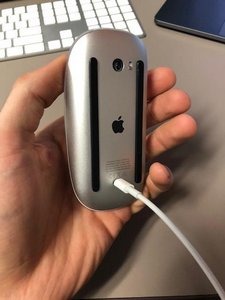
This is an Apple Magic Mouse being recharged.  Apple is frequently hailed as a model of design.  This is a poorly designed mouse. 

Image

Posted in Design | Comments Off on Apple design

Backup hardware and software recommendations for family computers

Lots of people ask about backup and disaster recovery for family computers. I use an external USB/eSATA case and Acronis True Image software to image all my friends and family computers. Reference links below for the hardware and software.

The biggest value to me has been flexibility in upgrading drives, decommissioning a system, and migrating to another system. Also, if (and this has NEVER happened) my system were to be compromised, it’s not worth my time and I don’t trust recovery of a compromised system. I will just restore my most recent image and recover my data from the cloud. Also, for people with kids in college, there is one less thing to worry about when they are away at school.

My recommendations:
” Rosewill external USB/eSATA enclosure
” 2TB or larger, fast SATA drive
” Acronis True Image Software

NOTE – Acronis updates its software every year. I have leveraged inexpensive multi-pack upgrades they offer to keep current and install the software on the many family computers…

I like the Rosewill enclosure because it can handle any SATA drive (small SSD to full size SATA) and the cooling fan can be switched on/off as required. I used this enclosure to expand the capacity of my DVR in the past as well as an external and backup drive for my laptops, desktops, and lab equipment.

For backups, I have been using the cheapest 2TB drives I can get and I keep the drives for ~5 years (after that I don’t trust them). Next replacement cycle I might go to 4TB drives.

There are lots of other options, so I included recommendations from The Wirecutter below for portable and external hard drives for reference.

Acronis True Image
https://www.amazon.com/s/ref=nb_sb_noss_1?url=search-alias%3Dsoftware&field-keywords=acronis

3.5 Inch Hard Drive Enclosure to USB 3.0 / eSATA
https://www.newegg.com/Product/Product.aspx?Item=N82E16817182247

The Best External Desktop Hard Drive – Jan 2018
https://thewirecutter.com/reviews/the-best-external-desktop-hard-drive/

The Best Portable Hard Drive – Oct 2017
https://thewirecutter.com/reviews/best-portable-hard-drive/

Posted in Uncategorized | Comments Off on Backup hardware and software recommendations for family computers

Browser recommendations – performance and security

This is a post to answer some regular questions I get from friends and family. I’ll update it regularly as required.

First, I use an ad blocker. Sites don’t like you to block ads, but there are so many malicious ads out there that chew up bandwidth, slow my browser, and clutter my screen that I don’t recommend using a browser without an ad blocker.

The ad blocker I recommend is uBlock Origin by Raymond Hill on Chrome, Firefox, Opera, and Microsoft Edge browsers.

Browsers I recommend:
” Firefox Quantum – currently the fastest browser I’ve tested and it works on just about every site I use.
” Google Chrome – good general use browser, and any Google sites are optimized for use with Chrome.
” Microsoft Edge – taking a lot of abuse from the tech crowd, but it’s fast, secure, and my only issue is problems with some sites.
” Epic Privacy Browser – based on Chrome, it’s designed to be secure. If you want to make sure you’re secure, this is the browser to use.
” Opera – another solid, fast browser, it has a nice VPN capability if you’re trying to access content that’s blocked based on your geography (example could be BBC content).

Next, I use the beta versions of the Firefox and Chrome browsers. They are very stable, all the add-ons and extensions I have work with the beta releases, and I think they are less vulnerable to exploits if I’m on a ‘not so safe site’. Reference links for both below, they are generally referenced as “dev channels” (as in development).

Next, if you want to make sure your browsing session is as secure as possible, check out the browsers below. Epic Privacy Browser and Opera (built-in VPN).

The Epic browser is particularly secure, but may give you problems on a financial services site or some commercial sites because it’s locked down pretty tight.

Epic Privacy Browser (based on Chrome)
https://www.epicbrowser.com/

Opera
http://www.opera.com/download

Chrome Dev Channel – I think you’re running 64 bit Windows, so pick that Beta Channel download.
https://www.chromium.org/getting-involved/dev-channel

Firefox Dev Channel – download the Beta version
https://www.mozilla.org/en-US/firefox/channel/desktop/

Microsoft Edge
https://www.microsoft.com/en-us/windows/microsoft-edge

Posted in Uncategorized | Comments Off on Browser recommendations – performance and security

Ajit Pai (FCC Chairman) is not our friend

We are watching the FCC sell out the consumers it is supposed to protect. Ajit Pai is the head of the FCC. He’s a smart guy, but he is not the friend of the consumer, he’s a former Communication Industry law partner. He’s selling Network Neutrality like he’s on an infomercial (it’s not what he says it is). Now they are proposing “direct to voicemail” calls.

My suggestion is to get a Google Voice account and configure it as the voicemail for your cell phone. It will automatically detect ‘SPAM’ calls and you have the option to block calls (or block all calls…).

Network World – technical background and reference links.

http://www.networkworld.com/article/3199565/security/tell-the-fcc-you-dont-want-robo-voicemail-spammy-direct-to-voicemail-messages.html

Consumers Union statement

https://consumersunion.org/news/fcc-urged-to-protect-consumers-from-unwanted-telemarketing-and-debt-collection-voicemails/

Posted in Uncategorized | Comments Off on Ajit Pai (FCC Chairman) is not our friend

Why do I hate DirecTV Now, let me count the ways

I got an e-mail from AT&T/DirecTV asking me to complete a survey on why I unsubscribed from DirecTV Now.  I spent quite a bit of time crafting a comprehensive answer, only to receive the notice below.  Part of my issue with DirecTV was the poor interface design. I now extend that criticism to the survey.  If you limit my response to 999 characters, why not tell me?  Then I won’t prepare a response that’s 302% larger than you will allow!

NOTE – there were two other text boxes, both limited the number of characters to other, smaller, and random quantities, both with no indication of what the limit would be. 

image

Here is my full response about why I unsubscribed from DirecTV Now:

DirecTV Now was a horrific
experience.  From the user
interface to buffering issues to the user interface (did I already say that,
yes, it’s that bad) to the content.  No type of DVR solution, ‘subscribing’ to channels was OK, but
non-intuitive to use.


No CBS channel.  At all.  Yes, I know you
have to negotiate with CBS, but it’s a gaping hole.  I added HBO and got two HBO channels added, which was underwhelming.  Even at $35/month rate it wasn’t worth
the money.  We watched ONE movie
(Deadpool) and the last 20 minutes of the film took almost an hour to watch due
to buffering issues.


Just so you don’t assume I have a poor Internet
connection, I have 200/10 Mbps (up/downlink speeds) and a commercial grade
firewall and wireless AP (Meraki).  Chemical engineer by degree, working in IT and connected to the Internet
since 1986 (not a typo), Cisco and other certifications.  Let’s just assume the problem is on your end and not my home
network…


Streaming from a laptop to a Chromecast was
USELESS.  I stream other content
(YouTube, other) to Chromecast with no issues using the exact same configuration
(laptop, wireless channel, etc).  Streaming from my PHONE (!!!) worked better than the laptop, and I can’t
account for that.  Is the Android
app that much more efficient than streaming from a browser on a
laptop?


No Roku support out of the gate.  Roku and beer are gifts from GOD, and you don’t support the Roku.  Seriously? 


I took advantage of the free Amazon Fire offer because,
as noted, you don’t support the Roku (aka, Gift From God).  Nice device, but DirecTV sucks at life, so we were ‘less than pleased’
with the experience. We attempted
to watch Deadpool (previous reference) using the Amazon Fire.  Other services worked fine, but not DirecTV Now.


And, the user interface sucks.  As an example, I saved ‘favorite’ channels in the guide and selected
Favorites to display. It’s all too
easy to suddenly have every channel displayed.  Next, I can’t seem to pause, continue,
and skip over content (like my DirecTV DVR). Yes, I realize there are device
constraints (but, shall I note, not on the Roku), but you’re not even
trying. Did you pull one of those
“Design this for free and I’ll give you great recommendations” with the
interface design team?  Because it
LOOKS like that’s what you did.


I’m doing this all from memory.  It’s like a nightmare where I can still see the screen doing something I
don’t want/like, oh, and the BUFFERING, Oh, the BUFFERING!!!


To summarize:

– User interface sucks

– No DVR capability

– No Roku support

– Buffering issues (with long shows?  You tell me)

– No CBS content

– Poor performance with Amazon Fire

– Poor performance with Chromecast

= DirecTV Now Sucks at life


That’s the short version of why I unsubscribed from
DirecTV Now.  I’m working furiously
to experiment with OTA TV, a local DVR, and cloud based services.  I’m willing to bet anything I put together will be a better, more
satisfying experience than DirecTV Now.


Love,

Paul & Barb

Posted in household, Internet, technology, Video | Tagged , , | Comments Off on Why do I hate DirecTV Now, let me count the ways

"A safe propane torch for applications around the home"

I get a feed from “Cool Tools” and this caught my eye.  I’m thinking of using it to remove snow or scare the shit out of my neighbors.  Looking for a backpack to hold the propane tank next.

Harbor Freight – Greenwood propane torch
http://www.harborfreight.com/propane-torch-91033.html

Note from Cool Tools:

“I was a small part of a Battle Bots team behind the robot Complete Control that was on Battle Bots recently on ABC. This $20 propane torch was on a robot. It was heralded as — I’m gonna sort of humble brag here — it was heralded as the most effective flame thrower in Battle Bots history because it recorded the first robot kill ever, which was really exciting for us. There’s a Youtube video of it. A minute and a half into the match, we get the robot in the gripper. We grab under the robot, lift them up, and then turn on the flame thrower. It’s a 3,000 degree torch, it’s coming from just a regular propane tank. The brilliance of this Harbor Freight tool is someone engineered it and figured out how to have it properly aspirated … It turns out just with a few little tweaks, including this spark gap generator, it became a robot killer. That was pretty awesome to see.”

Posted in household | Tagged | Comments Off on "A safe propane torch for applications around the home"